



Run 3
Rating:
4.83
Played:
42,157
What Is Run 3?
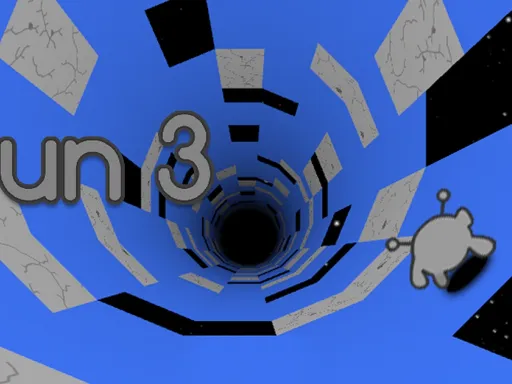
Run 3 is a fast platform runner set inside floating tunnels in space. You guide a small alien forward while tiles drop away, gaps open up, and gravity feels unpredictable. The tunnel is not just a straight road: when you move onto a side wall, that wall becomes your new floor. That single idea turns Run 3 from a basic runner into a puzzle game where you plan your line, not just your jumps.
Run 3 offers two main ways to play. In Explore Mode, you clear hand-built levels on a galaxy-style map, meet new characters, and learn new mechanics as the stages get tougher. In Infinite Mode, you try to survive as long as you can while collecting Power Cells, the in-game currency used for unlocks and upgrades.
Explore Mode is also where Run 3 feels most like an adventure. The galaxy map works like a level hub, and community documentation lists well over 300 stages when you include extras and side missions.
If you want to start instantly with no installs, you can play Run 3 in your browser on https://playeggycar.net.
Playing Run 3 in Your Browser
Run 3 fits the browser perfectly: quick to load and easy to restart. Modern versions run in HTML5, so you don’t need Flash support or a download.
For smoother play, use a keyboard, close heavy tabs, and try full-screen so you can spot holes earlier. If movement feels delayed, refresh the page once.
How to Control Run 3
Basic movement
Most versions use Arrow Keys or WASD. Move left and right to line up, then jump over gaps and broken tiles (often with Up or Space).
The gravity flip skill
The signature skill is learning when to change walls. When you drift into a side wall or jump toward it, the camera rotates and that wall becomes your new floor. This is how you “go around” a huge gap that would end your run in a normal runner.
A simple rule: rotate early. If you wait until the last second, you may land with no room to correct your path.
Characters and abilities
As you progress, Run 3 unlocks more playable characters, and each one changes how you handle tunnels. Some are fast but slippery, some jump higher, and some have special movement skills. Many guides describe nine characters unlocked by Explore Mode progress, achievements, and Power Cells earned in Infinite Mode, and they note you can often switch characters from the pause menu.
Tips for Getting Better at Run 3
- Aim for safe landings, not risky jumps. A clean landing gives you time to react.
- Rotate before you must. In Run 3, early wall choices prevent “no-space” mistakes.
- Use Infinite Mode for practice. The fast restarts help you build timing.
- Change characters when stuck. Different abilities can turn a hard tunnel into an easy one.
Why Run 3 Is So Popular
Run 3 looks simple, but it teaches you to think in 3D. Every rotation is a choice: which wall is the safest floor right now? Once you learn to read a tunnel, the game starts to feel like solving a moving maze instead of reacting in panic.
It also has a strong “one more try” loop. Runs are short, restarts are instant, and mistakes teach clear lessons—jump earlier, rotate sooner, or pick a different character.
Where Run 3 Came From
Run 3 is part of the Run series created by Joseph Cloutier, also known as player_03.
Community records list an early public release on Android on December 11, 2013, followed by a Flash browser release in June 2014, and later HTML5 versions after Flash support ended.
Common Questions About Run 3
Is Run 3 free to play?
Most online versions are free to start. On https://playeggycar.net, you can open Run 3 and begin playing in seconds.
What is the difference between Explore Mode and Infinite Mode?
Explore Mode is level-based and is the best place to learn. Infinite Mode is a survival run where your goal is to finish as many levels in a row as possible while collecting Power Cells.
Is there an ending?
Explore Mode has progress and unlocks, but Infinite Mode is designed to be endless. Documentation for Infinite Mode notes that levels can repeat and there is no true “win” screen—your goal is simply to go farther than last time.
What are Power Cells used for?
Power Cells unlock characters, outfits, and upgrades, and they can help you continue after falling in Infinite Mode (depending on upgrades and version).
How do I unlock more characters faster?
The most reliable path is to push forward in Explore Mode, because many characters unlock through progress. You can also earn Power Cells in Infinite Mode and complete achievements, which guides note are tied to unlocking and upgrading characters in Run 3.
Does the game save progress?
Explore Mode progress is usually saved in the same browser unless you clear site data. Infinite Mode is more like an arcade streak, so you chase a better run rather than a saved “story.”
Why does Run 3 feel so hard at first?
You are learning two skills at once: jump timing and wall choice. At first you see a hole and panic; later you see a hole and think, “Which wall lets me avoid it?” When that clicks, Run 3 becomes much easier to read.
Can I play Run 3 on a school or work network?
Sometimes game sites are blocked on shared networks. If that happens, try playing later on a home connection or any network where gaming is allowed. When it is available, Run 3 on https://playeggycar.net is a quick, browser-friendly option.
How do I reduce lag?
Close extra tabs, enable hardware acceleration, plug in your laptop (battery mode can slow graphics), and refresh the page if inputs feel late.
A Simple Starter Plan
Start with Explore Mode for 10–15 levels. Focus on calm movement and early wall changes. When you see a long gap, don’t force a late jump—rotate to a safer wall while you still have room to land. Then try Infinite Mode to build reflexes and collect Power Cells, and return to Explore Mode with new characters.
Run 3 rewards practice more than luck. When you’re ready for your next run, play Run 3 on https://playeggycar.net and see how far you can go.

Comments
Loading comments…